
오디오 파일 인식
API Description
This API provides speech recognition for long audio and video files.
Supported audio formats: mp3, wav, m4a, wma, aac, ogg, amr, fla.
Supported video formats: mp4, wmv, m4v, flv, rmvb, dat, mov, mkv, webm.
Request method: HTTP POST with
Content-Type set to "application/json; charset=utf-8".Audio upload options: Submit audio via a public URL or upload a local audio file.
Audio restrictions: For audio URLs, the maximum duration is 12 hours and the file size must not exceed 1GB. For local audio files, the file size must not exceed 5MB.
Retrieving results: Recognition results are available via webhook or polling.
Result retention: Results are stored on the server for 24 hours.
API Requirements
Follow these requirements when integrating the audio file recognition API.
Item | Description |
Supported Languages | Including zh (Chinese), en (English), yue (Cantonese), ar (Arabic), de (German), fr (French), es (Spanish), pt (Portuguese), id (Indonesian), it (Italian), ko (Korean), ru (Russian), th (Thai), vi (Vietnamese), ja (Japanese), tr (Turkish), hi (Hindi), ms (Malay), nl (Dutch), sv (Swedish), da (Danish), fi (Finnish), pl (Polish), cs (Czech), fil (Filipino), fa (Persian), el (Greek), ro (Romanian), hu (Hungarian), and mk (Macedonian). |
Supported Industries | General. |
Audio Properties | Sample rate: 16000Hz; Sample precision: 16 bits; Channel: mono |
Formats | Supported audio formats: mp3, wav, m4a, wma, aac, ogg, amr, fla; Supported video formats: mp4, wmv, m4v, flv, rmvb, dat, mov, mkv, webm. |
Request Protocol | HTTPS. |
Request URL | https://asr-intl.cloud-rtc.com/v1/CreateRecTask?{request parameters}. |
Response Format | JSON. |
Data Submission | Supports both local audio file upload and audio URL upload. Audio URL duration must not exceed 12 hours, file size must not exceed 1GB; local audio file size must not exceed 5MB. |
Concurrency Limit | Default limit is 20 requests per second per account, with a maximum of 200 concurrent tasks. |
Note:
Under the same SDKAppID, all real-time speech recognition scenarios—including direct STT access, AI Conversation, and AI Transcription/Translation—share a single concurrency pool. This means the total number of concurrent streams across all types cannot exceed the account's upper limit. One-Sentence Recognition and Audio File Recognition are calculated independently and do not consume the real-time recognition concurrency quota. If you require higher concurrency, please Contact Us.
Business Flowchart
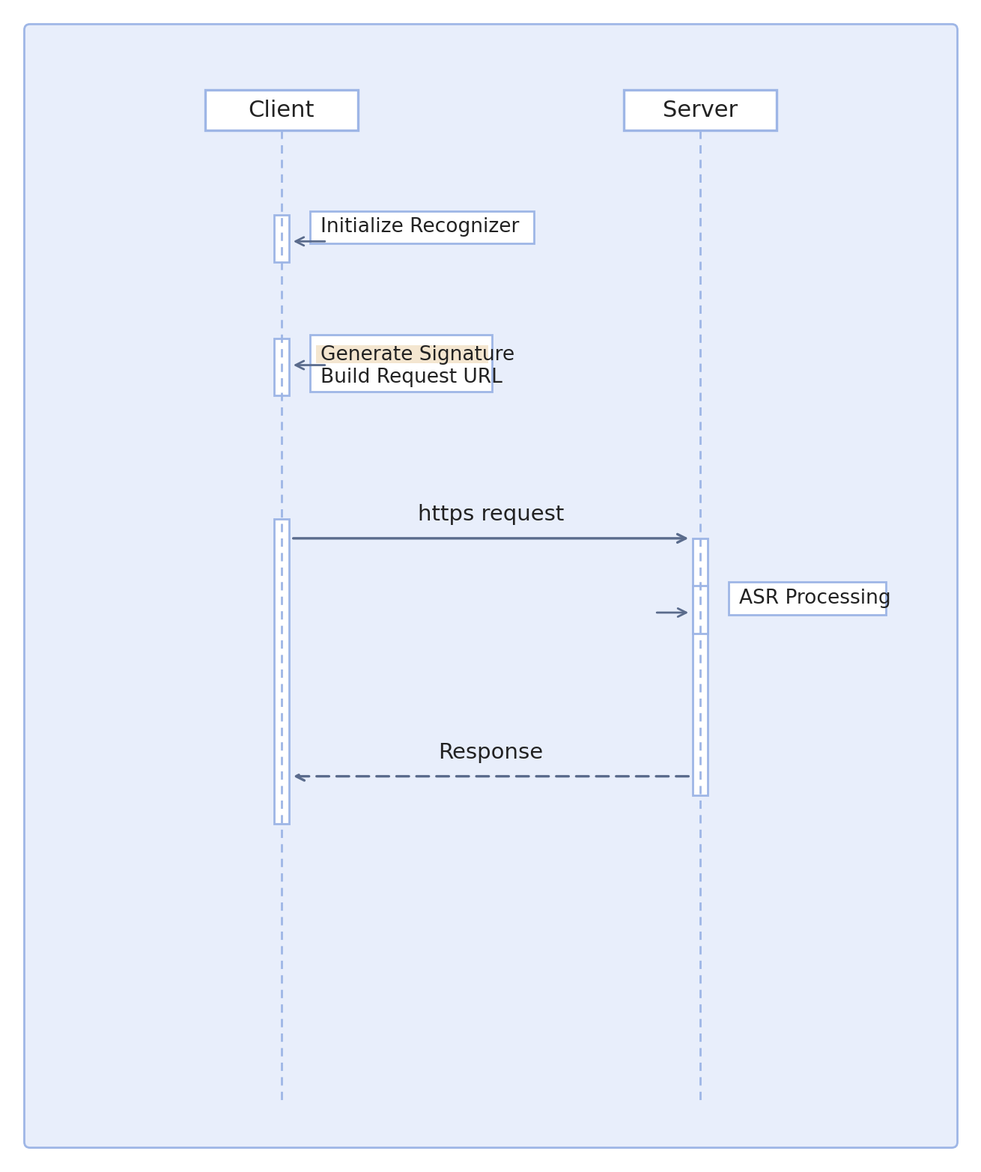
API Call Flow
Request Format
To start a recognition task, send an HTTP POST request. Use the following URL format: Production environment
https://asr-intl.cloud-rtc.com/v1/CreateRecTask?{request parameters}.Set these headers in your request:
key | Required | Value Description |
X-TRTC-SdkAppId | Yes | |
X-TRTC-UserSig | Yes | TRTC signature. For calculation and usage, see User Authentication. The UserID equals the RequestId parameter in the URL. |
Request Parameters
Request parameters format:
AppId=value1&Secretid=value2&Timestamp=value3&RequestId=value4.Parameter Description
Parameter | Required | Type | Description |
AppId | Yes | String | |
RequestId | Yes | String | Globally unique request ID (UUID), used to generate the UserSig for the request. |
Secretid | Yes | String | Tencent Cloud account SecretId, available from API Key Management. |
Timestamp | Yes | Integer | Current UNIX timestamp in seconds. A timestamp that differs significantly from the current time can cause a signature expiration error. |
Input Parameters
The request body must be in JSON format.
Parameter Description
Parameter | Required | Type | Description |
EngineModelType | Yes | String | Engine model type. Supported values: bigmodel: Large model edition. |
ResTextFormat | Yes | Integer | Recognition result format: 0: Basic result (contains only valid speech timestamps, no word-level details); 1: Includes word-level details (word timestamps, speech speed, excludes punctuation); 2: Includes word-level details (word timestamps, speech speed, and punctuation). 3: Includes word-level details and intelligent sentence segmentation (word timestamps, speech speed, punctuation, and intelligent sentence segmentation). |
ChannelNum | Yes | Integer | Supported values: 1 or 2.When ChannelNum is 2, SpeakerDiarization cannot be enabled. The left and right channels are returned by ChannelId. |
SpeakerDiarization | No | Integer | Speaker diarization and role verification configuration. 0: Disable speaker diarization. 1: Enable speaker diarization. Available only when ChannelNum is 1. 3: Enable speaker diarization with role verification. Must be used with either SpeakerRoles or VoiceprintIds. Default: 0. |
SpeakerRoles | No | Array of SpeakerRoleInfo | Temporary voiceprint information, valid only for the current recognition task. Use with SpeakerDiarization set to 3. Each object contains AudioUrl (a publicly accessible WAV voiceprint audio URL) and RoleName (the role name). The voiceprint audio must contain 10 to 30 seconds of clear, valid speech. |
VoiceprintIds | No | Array of String | Registered voiceprint IDs. Use with SpeakerDiarization set to 3. Register voiceprints before use. |
NoiseThreshold | No | Float | Noise threshold. Default: 2.0. Valid range: [0.0, 4.0]. A larger value makes an audio segment more likely to be classified as noise; a smaller value makes it more likely to be classified as speech. |
SourceType | Yes | Integer | Audio source: 0: Audio URL; 1: Audio data (POST body). |
CallbackUrl | No | String | Webhook URL for receiving recognition results. For webhook format and content, see: Audio Recognition Webhook Description. Note: If you use polling to retrieve results, this parameter is not required. It is recommended to include your business ID or other information in the webhook URL for easier business logic handling. |
Url | No | String | Audio file URL, must be publicly accessible and downloadable. Required when SourceType is 0; not required when SourceType is 1. Maximum duration: 12 hours; maximum file size: 1GB. |
Data | No | String | Audio data. Required when SourceType is 1 (local audio upload); optional when SourceType is 0 (audio URL upload). Must be Base64 encoded. (In Python, read the file as a string, not bytes. If read as bytes, use decode(). Encoded data must not contain carriage returns or newlines.) Maximum file size after Base64 encoding: 5MB. |
DataLen | No | Integer | Data length in bytes. Required when SourceType is 1 (local audio upload); optional when SourceType is 0 (audio URL upload). (This is the length before Base64 encoding.) |
FilterDirty | No | Integer | Profanity filtering (Mandarin Chinese): 0: Do not filter; 1: Filter; 2: Replace profanities with * Default is 0. |
FilterModal | No | Integer | Modal particle filtering (Mandarin Chinese): 0: Do not filter; 1: Partial filter; 2: Strict filter Default is 0. |
FilterPunc | No | Integer | Punctuation filtering (Mandarin Chinese): 0: Do not filter; 1: Filter sentence-ending punctuation Default is 0. |
ConvertNumMode | No | Integer | Intelligent conversion of Arabic numerals: 0: No conversion, output Chinese numerals; 1: Convert to Arabic numerals based on context Default is 1. |
HotwordList | No | String | Temporary hotword list to improve recognition accuracy. Single hotword format: "hotword|weight". Each hotword must not exceed 30 characters (or 10 Chinese characters). Supported weights: 1-11 or 100. For example: "Tencent|5" or "ASR|11". Multiple hotwords must be separated by commas. A maximum of 128 hotwords is supported. For example: "hotword|10,Tencent|5,ASR|11". Note: A weight of 11 upgrades the hotword to a super hotword. Use this weight only for important terms that must take effect; configuring too many super hotwords may reduce overall recognition accuracy. A weight of 100 enables enhanced homophone replacement. For example, if "site|100" is configured, recognition results such as "sight" or "cite", which share the same pronunciation, are forcibly replaced with "site". Use this setting only for important terms that must take effect; configuring too many such hotwords may reduce overall recognition accuracy. Hotwords cannot contain spaces. For example, use "OpenAIAPI" rather than "OpenAI API". |
Language | No | String | When EngineModelType is set to bigmodel, you can specify the audio language. Supported languages: zh (Chinese), en (English), yue (Cantonese), ar (Arabic), de (German), fr (French), es (Spanish), pt (Portuguese), id (Indonesian), it (Italian), ko (Korean), ru (Russian), th (Thai), vi (Vietnamese), ja (Japanese), tr (Turkish), hi (Hindi), ms (Malay), nl (Dutch), sv (Swedish), da (Danish), fi (Finnish), pl (Polish), cs (Czech), fil (Filipino), fa (Persian), el (Greek), ro (Romanian), hu (Hungarian), mk (Macedonian). Example value: zh. Note: If this field is left empty, the model will automatically detect the language. |
Response Format
Responses are returned in JSON format. All fields are contained within the top-level Response object.
Parameter Description
Parameter | Type | Description |
Response | Object | Top-level response object containing the following fields. |
Response.RequestId | String | RequestId for this request. Provide this when troubleshooting issues. |
Response.Data | Object | Response data object containing the following fields. |
Response.Data.RecTaskId | String | Generated by the server. Returned in the recognition request and required for result queries. Note: RecTaskId is valid for 24 hours. RecTaskId may be duplicated on different dates; do not use RecTaskId as the unique ID in your business system. |
Example
A user submits an audio file recognition request with
SourceType=1:Request URL:
https://asr-intl.cloud-rtc.com/v1/CreateRecTask?AppId=...&Secretid=*****&Timestamp=17XXXXXX88&RequestId=...
Input Parameters
{"EngineModelType": "bigmodel","ResTextFormat": 0,"ChannelNum": 1,"SourceType": 1,"Data": "xxxxxxxx","DataLen": 8}
Response
{"Response": {"RequestId": "24fe80e8-5b0c-4232-866f-4a402ee3127b","Data": {"RecTaskId": "TT1Ie0V0voyHKBrWqqUZw57smgjSR3K1eazaxrmIuEZoeyw+xUgmJ+Y5eli2U9Y2dcpUF4wsMOqPjQAPxw8bvcUoWTON2M6wjcBZcHtrpt0Dm"}}}
Audio File Webhook Description
If you specify the CallbackUrl parameter in your recognition request, results will be sent to your webhook. Set up an HTTP or HTTPS endpoint accessible from the public internet and provide the webhook URL in CallbackUrl when creating the recognition task. The webhook uses HTTP POST, with all content in the request body and Content-Type set to
application/x-www-form-urlencoded.Webhook Body Description
Example webhook body:
code=0&requestId=DYz1ieNlIyb5nZT+R9kQsCAocpoDD6l1qvqam7XBk78PDQ..&appid=12516****&text=%5B0&audioTime=8.420000&message=&resultDetail=
Webhook Parameter Description
Name | Type | Description |
code | Integer | Task status code: 0 for success, other values indicate failure. |
message | String | Failure reason; empty if successful. |
requestId | String | Unique task identifier, matches RecTaskId returned in the recognition request. |
appid | Integer | AppId for the request. |
audioUrl | String | Audio URL. Not included if the task was created by uploading data. |
text | String | Recognized text result. |
resultDetail | String | Detailed recognition results. Not included if ResTextFormat was 0 when creating the task. |
audioTime | Float | Total audio duration (seconds). |
Detailed Recognition Results
SentenceDetail
Provides recognition details for each sentence, including word-level time offsets.
Name | Type | Description |
FinalSentence | String | Final recognized sentence. Note: This field may be null if no valid value is available. |
WrittenText | String | Written-language version of the recognized sentence. Returned only when the corresponding capability is enabled. |
SpeakerId | Integer | Speaker ID. Returned when speaker diarization is enabled. |
SpeakerRoleName | String | Role name. Returned when SpeakerDiarization is 3 and voiceprint matching succeeds. |
SliceSentence | String | Intermediate result for the sentence, split into words by spaces. Note: This field may be null if no valid value is available. |
StartMs | Integer | Sentence start time (milliseconds). Note: This field may be null if no valid value is available. |
EndMs | Integer | Sentence end time (milliseconds). Note: This field may be null if no valid value is available. |
WordsNum | Integer | Number of words in the sentence. Note: This field may be null if no valid value is available. |
Words | Array of SentenceWords | Details for each word in the sentence. Note: This field may be null if no valid value is available. |
SpeechSpeed | Float | Speech speed for the sentence, measured in characters per second. Note: This field may be null if no valid value is available. |
SentenceWords
Contains the recognized word and its time offsets.
Name | Type | Description |
Word | String | Recognized word. Note: This field may be null if no valid value is available. |
StartTime | Integer | Start time offset within the sentence. Note: This field may be null if no valid value is available. |
EndTime | Integer | End time offset within the sentence. Note: This field may be null if no valid value is available. |
Webhook Status Codes
Value | Description |
10000 | Transcoding failed. Please verify the audio format meets the requirements. |
10001 | Recognition failed. |
10002 | Audio duration too short. |
10003 | Audio duration too long. |
10004 | Invalid audio file. |
10005 | Other failure. |
10006 | Audio track count mismatch. |
10007 | Audio download failed. |
Audio File Recognition Result Query
API Description
After submitting an audio file recognition request, you can retrieve results via webhook or polling. For webhook details, see Audio File Webhook Description.
Note:
Task validity is 24 hours. Do not query tasks older than 24 hours, and do not rely on RecTaskId as a unique business ID. RecTaskId may be duplicated on different dates.
For polling, submit the task ID to query recognition results. Task states include: success, waiting, in progress, and failed. See below for details.
Request method: HTTP POST,
Content-Type: "application/json; charset=utf-8".Default API request rate limit: 50 requests per second.
Item | Description |
Request Protocol | HTTPS. |
Request URL | https://asr-intl.cloud-rtc.com/v1/DescribeTaskStatus?{request parameters}. |
Response Format | JSON. |
Concurrency Limit | Default limit is 50 requests per second per account. |
Request Format
Send an HTTP POST request using the following URL format: Production environment
https://asr-intl.cloud-rtc.com/v1/DescribeTaskStatus?{request parameters}.Set these headers in your request:
key | Required | Value Description |
X-TRTC-SdkAppId | Yes | |
X-TRTC-UserSig | Yes | TRTC signature. For calculation and usage, see User Authentication. The UserID equals the RequestId parameter in the URL. |
Request Parameters
Request parameters format:
AppId=value1&Secretid=value2&Timestamp=value3&RequestId=value4.Parameter Description
Parameter | Required | Type | Description |
AppId | Yes | String | |
RequestId | Yes | String | Globally unique request ID (UUID), used to generate the UserSig for the request. |
Secretid | Yes | String | Tencent Cloud account SecretId, available from API Key Management. |
Timestamp | Yes | Integer | Current UNIX timestamp in seconds. A timestamp that differs significantly from the current time can cause a signature expiration error. |
Input Parameters
The request body must be in JSON format.
Parameter | Required | Type | Description |
RecTaskId | Yes | String | RecTaskId obtained from the CreateRecTask API. Use this to query task status and results. Note: RecTaskId is valid for 24 hours. Do not query RecTaskIds older than 24 hours. |
Output Parameters
The response body is in JSON format. All fields are contained within the top-level Response object.
Parameter | Type | Description |
Response | Object | Top-level response object. |
Response.Data | TaskStatus | Recognition result for the audio file request. |
Response.RequestId | String | Unique request ID generated by the server. Returned for each request (if the request does not reach the server, no RequestId will be returned). Provide this when troubleshooting issues. |
TaskStatus structure:
Name | Type | Description |
RecTaskId | String | Task identifier. RecTaskId is a String. |
Status | Integer | Task status code: 0: Waiting; 1: In progress; 2: Success; 3: Failed. |
StatusStr | String | Task status: waiting: Waiting; doing: In progress; success: Success; failed: Failed. |
Result | String | Recognition result. When SpeakerDiarization is enabled, the result can include a speaker marker, for example: [0:0.200,0:1.380,spk:1] hello. |
ErrorMsg | String | Failure reason description. |
ResultDetail | Array of SentenceDetail | Detailed recognition results. Includes word-level time offsets for each sentence, typically used for generating subtitles. (If ResTextFormat is not 0 in the recognition request, this field will not be empty.) Note: This field may be null if no valid value is available. |
AudioDuration | Float | Audio duration (seconds). Note: This field may be null if no valid value is available. |
Progress | Integer | Processing progress, in 1% increments. |
Query Example
Request URL
https://asr-intl.cloud-rtc.com/v1/DescribeTaskStatus?RequestId=2f5e8263-a23b-4e65-be22-6b7c19bd4064&AppId=12345
Input Parameters
{"RecTaskId": "DYz1ieNlIyb5nZT+R9kQsCAocpoDD6l1qvqam7XBk78PDQ.."}
Response
{"Response": {"RequestId": "2f5e8263-a23b-4e65-be22-6b7c19bd4064","Data": {"RecTaskId": "DYz1ieNlIyb5nZT+R9kQsCAocpoDD6l1qvqam7XBk78PDQ..","Status": 2,"StatusStr": "success","AudioDuration": 2.38,"Result": "[0:0.200,0:1.380,spk:1] hello。\n","ResultDetail": [{"FinalSentence": "hello。","SliceSentence": "hello","StartMs": 200,"EndMs": 1380,"SpeechSpeed": 2,"WordsNum": 1,"Words": [{"Word": "hello","StartTime": 200,"EndTime": 1380}]}],"ErrorMsg": ""}}}
Developer Resources
SDK
Tencent-RTC SDK for go: Github
Tencent-RTC SDK for python: Github
Tencent-RTC SDK for nodejs: Github
Tencent-RTC SDK for java: Github
Tencent-RTC SDK for rust: Github
Tencent-RTC SDK for cpp: Github
SDK Sample Code
Golang
Python
Node.js
Java
Rust
CPP