
문장 인식
API Description
The One-Sentence Recognition API transcribes short audio files up to 60 seconds in duration.
Supported audio formats: wav, pcm, ogg-opus, mp3, m4a.
Requests must use HTTP POST with
Content-Type: application/json; charset=utf-8.API Requirements
Follow these requirements when integrating the One-Sentence Recognition API.
Item | Description |
Supported Languages | Including zh (Chinese), en (English), yue (Cantonese), ar (Arabic), de (German), fr (French), es (Spanish), pt (Portuguese), id (Indonesian), it (Italian), ko (Korean), ru (Russian), th (Thai), vi (Vietnamese), ja (Japanese), tr (Turkish), hi (Hindi), ms (Malay), nl (Dutch), sv (Swedish), da (Danish), fi (Finnish), pl (Polish), cs (Czech), fil (Filipino), fa (Persian), el (Greek), ro (Romanian), hu (Hungarian), and mk (Macedonian). |
Supported Industries | General purpose. |
Audio Properties | Sample rate: 16000Hz (pcm format supports 8000Hz via the InputSampleRate parameter; see Input Parameters section); Sample precision: 16 bits; Channel: mono. |
Audio Formats | wav, pcm, ogg-opus, mp3, m4a. |
Request Protocol | HTTPS protocol. |
Request URL | https://asr-intl.cloud-rtc.com/v1/SentenceRecognition?{request parameters}. |
Response Format | JSON. |
Data Submission | Supports two methods: uploading a local audio file or providing an audio URL. Audio duration must not exceed 60 seconds, and file size must not exceed 3MB. |
Concurrency Limit | The default concurrency limit per account is 30 requests per second. |
Note:
Under the same SDKAppID, all real-time speech recognition scenarios—including direct STT access, AI Conversation, and AI Transcription/Translation—share a single concurrency pool. This means the total number of concurrent streams across all types cannot exceed the account's upper limit. One-Sentence Recognition and Audio File Recognition are calculated independently and do not consume the real-time recognition concurrency quota. If you require higher concurrency, please Contact Us.
Workflow
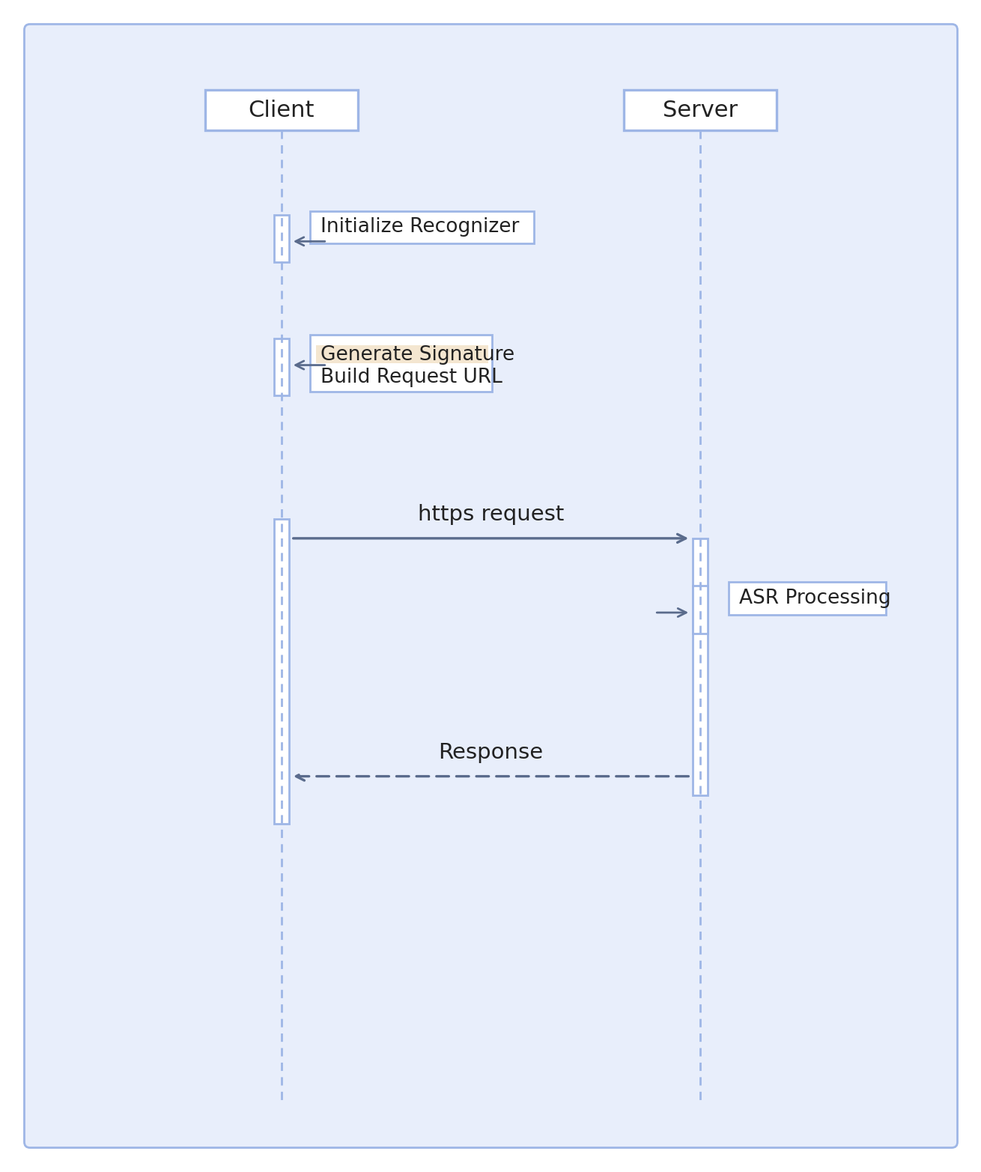
API Call Flow
Request Format
To call the API, send an HTTP POST request. The production URL format is:
https://asr-intl.cloud-rtc.com/v1/SentenceRecognition?{request parameters}Add the following fields to the request header:
key | Required | Value Description |
X-TRTC-SdkAppId | Yes | |
X-TRTC-UserSig | Yes | TRTC Signature. See User Authentication for calculation and usage. The UserID here matches the RequestId parameter in the URL. |
X-Business-Name | No | Leave empty unless instructed by the platform after internal business communication. Do not fill arbitrarily. |
Request Parameters
Request parameters format:
AppId=value1&RequestId=value2Parameter details:
Parameter Name | Required | Type | Description |
AppId | Yes | String | |
RequestId | Yes | String | Globally unique request ID (UUID). Used to generate the UserSig for this request. |
Input Parameters
The request body must be in JSON format.
Parameter details:
Parameter Name | Required | Type | Description |
EngServiceType | Yes | String | Engine model type. Supported value: bigmodel: Large model edition. |
SourceType | Yes | Integer | Audio data source: 0: Audio URL; 1: Audio data (request body). |
VoiceFormat | Yes | String | Audio format for recognition. Supported formats: wav, pcm, ogg-opus, mp3, m4a. |
Url | No | String | Audio URL. Must be publicly accessible. Required when SourceType is 0; not needed when SourceType is 1. Audio duration must not exceed 60 seconds, file size must not exceed 3MB. |
Data | No | String | Audio data. Required for SourceType 1 (local upload); optional for SourceType 0 (audio URL). Must be Base64 encoded. (If using Python, ensure the file is read as a string, not bytes. If read as bytes, use decode(). Encoded data must not contain line breaks.) Audio duration must not exceed 60 seconds, and file size must not exceed 3MB (after Base64 encoding). |
DataLen | No | Integer | Length of the audio data in bytes. Required for SourceType 1 (local upload); optional for SourceType 0 (audio URL). This is the length before Base64 encoding. |
WordInfo | No | Integer | Controls word-level timestamp display: 0: Do not display; 1: Display, exclude punctuation timestamps; 2: Display, include punctuation timestamps. Default: 0. |
FilterDirty | No | Integer | Profanity filter (Mandarin Chinese): 0: Do not filter; 1: Filter; 2: Replace profanities with *. Default: 0. |
FilterModal | No | Integer | Modal word filter (Mandarin Chinese): 0: Do not filter; 1: Partial filter; 2: Strict filter. Default: 0. |
FilterPunc | No | Integer | Punctuation filter (Mandarin Chinese): 0: Do not filter; 1: Filter sentence-ending punctuation; 2: Filter all punctuation. Default: 0. |
ConvertNumMode | No | Integer | Smart conversion to Arabic numerals: 0: Output Chinese numerals directly; 1: Convert to Arabic numerals based on context. Default: 1. |
HotwordList | No | String | Temporary hotword list to improve recognition accuracy. Single hotword format: "hotword|weight". Each hotword must not exceed 30 characters (or 10 Chinese characters). Supported weights: 1-11 or 100. For example: "Tencent|5" or "ASR|11". Multiple hotwords must be separated by commas. A maximum of 128 hotwords is supported. For example: "hotword|10,Tencent|5,ASR|11". Note: A weight of 11 upgrades the hotword to a super hotword. Use this weight only for important terms that must take effect; configuring too many super hotwords may reduce overall recognition accuracy. A weight of 100 enables enhanced homophone replacement. For example, if "site|100" is configured, recognition results such as "sight" or "cite", which share the same pronunciation, are forcibly replaced with "site". Use this setting only for important terms that must take effect; configuring too many such hotwords may reduce overall recognition accuracy. Hotwords cannot contain spaces. For example, use "OpenAIAPI" rather than "OpenAI API". |
InputSampleRate | No | Integer | Supports upsampling 8k pcm audio to 16k for recognition when the engine sample rate does not match, improving accuracy. Only supports: 8000. For example, if 8000 is passed, pcm audio sample rate is 8k; when using the 16k_zh engine, 8k pcm audio can be recognized normally. Note: This parameter applies only to pcm audio. If not provided, default behavior is used (engine sample rate matches pcm audio sample rate). |
Language | No | String | When EngServiceType is set to bigmodel, you can specify the audio language. Supported languages: zh (Chinese), en (English), yue (Cantonese), ar (Arabic), de (German), fr (French), es (Spanish), pt (Portuguese), id (Indonesian), it (Italian), ko (Korean), ru (Russian), th (Thai), vi (Vietnamese), ja (Japanese), tr (Turkish), hi (Hindi), ms (Malay), nl (Dutch), sv (Swedish), da (Danish), fi (Finnish), pl (Polish), cs (Czech), fil (Filipino), fa (Persian), el (Greek), ro (Romanian), hu (Hungarian), mk (Macedonian). Example value: zh.Note: If this field is left empty, the model will automatically detect the language. |
Response Format
Responses are returned in JSON format. All fields are contained within the top-level Response object.
Parameter details:
Parameter Name | Type | Description |
Response | Object | Top-level response object containing the following fields. |
Response.Result | String | Recognition result. |
Response.AudioDuration | Integer | Audio duration of the request, in milliseconds. |
Response.WordSize | Integer | Length of the word timestamp list. Note: This field may return null if no valid value is available. |
Response.WordList | Array of SentenceWord | Word timestamp list. Note: This field may return null if no valid value is available. |
Response.RequestId | String | RequestId for this request. Provide this RequestId when troubleshooting issues. |
SentenceWord definition:
Name | Type | Description |
Word | String | Recognized word. |
StartTime | Integer | Start time of the word in the audio. |
EndTime | Integer | End time of the word in the audio. |
Example
Here is an example of a One-Sentence Recognition request with SourceType=1:
Request URL:
https://asr.cloud-rtc.com/v1/SentenceRecognition?AppId=12345&RequestId=2f5e8263-a23b-4e65-be22-6b7c19bd4064
Input parameters:
{"EngSerViceType": "bigmodel","SourceType": 1,"VoiceFormat": "wav","Data": "xxxxxxxx","DataLen": 8}
Response:
{"Response": {"Result": "Within what we can accept.","RequestId": "2f5e8263-a23b-4e65-be22-6b7c19bd4064","AudioDuration": 1840}}
Developer Resources
SDK
Tencent-RTC SDK for go: Github
Tencent-RTC SDK for python: Github
Tencent-RTC SDK for nodejs: Github
Tencent-RTC SDK for java: Github
Tencent-RTC SDK for rust: Github
Tencent-RTC SDK for cpp: Github
SDK Sample Code
Golang
Python
Node.js
Java
Rust
CPP
Error Codes
Code | Description |
400 | Audio upload failed. |
413 | Audio file exceeds size or duration limit. |
400 | Audio file is empty. |
400 | Request body format error. |
4002 | Authentication failed. |
4003 | AppID service not enabled. Please enable the service in the console. |
4004 | Resource Package exhausted. Please enable Pay-as-you-go or purchase a Resource Package. |
4005 | Account suspended due to overdue payment. Please recharge promptly. |
4006 | Account concurrency limit exceeded. |
4007 | Audio decoding failed. Please verify that the uploaded audio format matches the request parameters. |
5000 | Recognition failed due to high machine load or network jitter. Please retry. Note: This issue is typically sporadic and can be ignored if infrequent. Simply retry recognition. |
5001 | Recognition failed due to high machine load or network jitter. Please retry. Note: This issue is typically sporadic and can be ignored if infrequent. Simply retry recognition. |
5002 | Recognition failed due to high machine load or network jitter. Please retry. Note: This issue is typically sporadic and can be ignored if infrequent. Simply retry recognition. |