
Real-time Speech Recognition
API Description
This API leverages the WebSocket protocol to deliver real-time speech recognition for audio streams. Recognition results are returned synchronously, enabling instant transcription as audio is received.
API Requirements
Follow these requirements when integrating the real-time speech recognition API.
Item | Description |
Supported Languages | Including zh (Chinese), en (English), yue (Cantonese), ar (Arabic), de (German), fr (French), es (Spanish), pt (Portuguese), id (Indonesian), it (Italian), ko (Korean), ru (Russian), th (Thai), vi (Vietnamese), ja (Japanese), tr (Turkish), hi (Hindi), ms (Malay), nl (Dutch), sv (Swedish), da (Danish), fi (Finnish), pl (Polish), cs (Czech), fil (Filipino), fa (Persian), el (Greek), ro (Romanian), hu (Hungarian), and mk (Macedonian). |
Supported Industries | General purpose. |
Audio Properties | Sample rate: 16,000Hz or 8,000Hz; Sample precision: 16 bits; Channel: Mono. |
Audio Format | PCM. |
Request Protocol | WSS protocol. |
Request URL | wss://asr-intl.cloud-rtc.com/asr/v2/<appid>?{request parameters}. TRTC authentication information (SdkAppId and UserSig) may be supplied either through a WebSocket header or through URL query parameters. You may choose either one. |
Response Format | JSON. |
Data Transmission | Transmit a data packet every 40ms, each containing 40ms of audio (1:1 real-time rate). PCM size: 640 bytes for 8k sample rate, 1280 bytes for 16k sample rate. If the interval between audio packets exceeds 15 seconds, and the backend will return an error and disconnect the session. |
Concurrency Limit | Default concurrency limit per account is 200 streams. |
Note:
Under the same SDKAppID, all real-time speech recognition scenarios—including direct TTS access, AI Conversation, and AI Transcription/Translation—share a single concurrency pool. This means the total number of concurrent streams across all types cannot exceed the account's upper limit. One-Sentence Recognition and Audio File Recognition are calculated independently and do not consume the real-time recognition concurrency quota. If you require higher concurrency, please Contact Us.
Business Flow Diagram
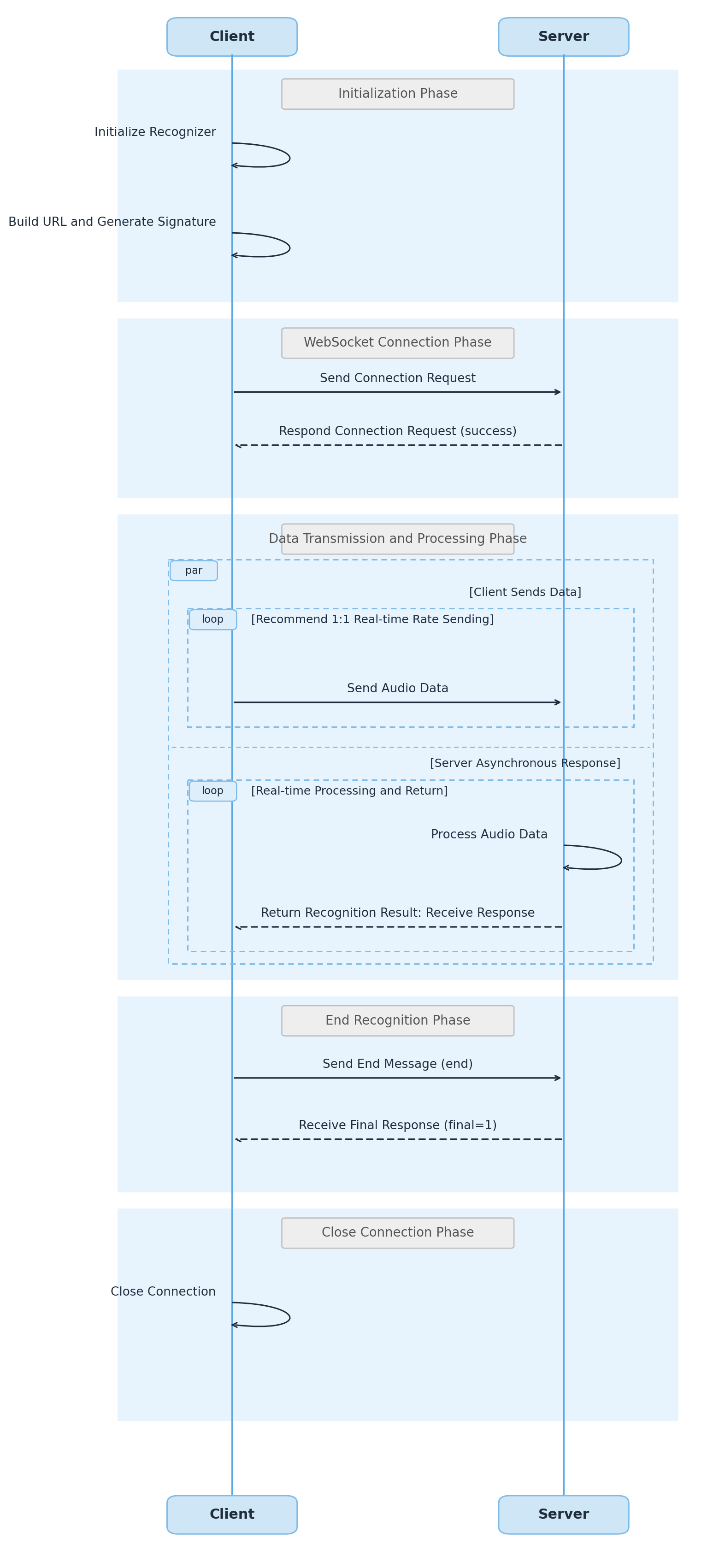
API Call Flow
The API call flow consists of two stages: handshake and recognition. During both stages, the backend returns a text message containing a JSON serialized string. The format is described as follows:
Field Name | Type | Description |
code | Integer | Status code: 0 indicates success, non-zero indicates an error. |
message | String | Error description. |
voice_id | String | Globally unique identifier for the audio stream. Each WebSocket connection uses a distinct identifier. Users must generate this value (UUID recommended), up to 128 characters. Note: Generate a new voice_id for every WebSocket connection. If recognition or the connection is interrupted (e.g., connection failure, normal end, error code returned), the voice_id becomes invalid. To restart recognition, use a new voice_id. |
message_id | String | Unique ID for this message. |
result | Result | Latest speech recognition result. |
final | Integer | A value of 1 indicates that recognition for the entire audio stream is complete. |
The Result structure for recognition results is as follows:
Field Name | Type | Description |
slice_type | Integer | Recognition result type: 0: Start of a segment; 1: Segment in progress; voice_text_str is a partial result (subject to change); 2: Segment ended; voice_text_str is a final result (will not change). Depending on audio transmission, possible slice_type sequences during recognition are: 0-1-2: Segment start, in progress (may return multiple 1 values), end; 0-2: Segment start, end; 2: Directly returns a complete segment result. |
index | Integer | Segment index within the audio stream, starting from 0 and incrementing for each segment. |
start_time | Integer | Start time of the segment in the audio stream. |
end_time | Integer | End time of the segment in the audio stream. |
voice_text_str | String | Transcribed text for the segment, encoded in UTF-8. |
language | String | The recognized language type of the segment in the audio stream.For example: zh. |
word_size | Integer | Number of words in the segment (word_list array length equals word_size). |
word_list | Word Array | Current word list for the utterance. The Word structure is as follows: word: String, the word content. start_time: Integer, the start time of the word in the complete audio stream. end_time: Integer, the end time of the word in the complete audio stream. stable_flag: Integer, indicates whether the word is stable. 0 indicates that the word may change during subsequent recognition; 1 indicates that the word will not change during subsequent recognition. speaker_id: Available when real-time speaker diarization is enabled. -1: Unknown speaker. >0: Speaker ID. speaker_name: Identifier of the registered voiceprint speaker. |
speaker_segments | SpeakerSegment Array | Returned when real-time speaker diarization is enabled. Indicates the speaker segment results for the current utterance. speaker_id: Integer, speaker ID. -1 indicates an unknown speaker; >0 indicates a speaker ID. start_time: Integer, segment start time. end_time: Integer, segment end time. text: String, text content. word_start: Integer, start index in the corresponding word_list. word_end: Integer, end index in the corresponding word_list. stable_flag: Integer, indicates whether the result is stable. speaker_name: Identifier of the registered voiceprint speaker. |
Handshake Stage
Request Format
During the handshake stage, the client initiates a WebSocket connection request. The request URL format is: Production environment
wss://asr-intl.cloud-rtc.com/asr/v2/<appid>?{request parameters}.SdkAppId and UserSig can be passed in either of the following two ways. Choose one of them:
Method 1 (recommended): Set them in the WebSocket header, with the fields shown in the table below:
key | Required | Value Description |
X-TRTC-SdkAppId | Yes | |
X-TRTC-UserSig | Yes | TRTC signature. For calculation and usage, see User Authentication. UserID equals the voice_id parameter in the URL. |
Replace with your Tencent Cloud registered appid, which can be obtained from API Key Management. The {request parameters} format is:
key1=value1&key2=value2...
Method 2
: Pass them as query parameters in the request URL (sdkappid, usersig; see the parameter description below), for access scenarios such as browsers where the WebSocket header cannot be customized.sdkappid=xxxxxxxxxxx&usersig=xxxxxxxxxxxxxxx
Parameter descriptions:
Parameter Name | Required | Type | Description |
secretid | Yes | String | |
timestamp | Yes | Integer | Current UNIX timestamp in seconds. If the difference from the current time is too large, a signature expiration error will occur. Example: 1745932688. |
expired | Yes | Integer | Signature expiration time as UNIX timestamp in seconds. expired must be greater than timestamp and expired - timestamp must be less than 90 days. |
nonce | Yes | Integer | Random positive integer, user-generated, up to 10 digits. Example: 8743357. |
engine_model_type | Yes | String | Engine model type. Supported values: bigmodel: large language model version. |
language | No | String | When engine_model_type is set to bigmodel, you can specify the audio language. Supported languages include: zh (Chinese), en (English), yue (Cantonese), ar (Arabic), de (German), fr (French), es (Spanish), pt (Portuguese), id (Indonesian), it (Italian), ko (Korean), ru (Russian), th (Thai), vi (Vietnamese), ja (Japanese), tr (Turkish), hi (Hindi), ms (Malay), nl (Dutch), sv (Swedish), da (Danish), fi (Finnish), pl (Polish), cs (Czech), fil (Filipino), fa (Persian), el (Greek), ro (Romanian), hu (Hungarian), mk (Macedonian).Example value: zh. Note: If this field is left empty, the model will automatically detect the language. |
speaker_diarization | No | Integer | Configuration option for real-time speaker diarization. 0: Speaker diarization disabled. 1: Speaker diarization enabled. 3: Enables speaker diarization with speaker role verification. Must be used together with the voiceprint_ids parameter. Default value: 0. |
voiceprint_ids | No | String Array | Configuration option for real-time speaker voiceprint matching IDs. The values of this parameter are obtained through the Voiceprint Registration API. This parameter is an array and supports up to 32 voiceprints. Example: [" 550e8400-e29b-41d4-a716-446655440000", "550e8400-e29b-41d4-a716-446655440002"] |
voice_id | Yes | String | Globally unique identifier for the audio stream. Each WebSocket connection uses a distinct identifier. Users must generate this value (UUID recommended), up to 128 characters. Note: Generate a new voice_id for every WebSocket connection. If recognition or the connection is interrupted (e.g., connection failure, normal end, error code returned), the voice_id becomes invalid. To restart recognition, use a new voice_id. |
voice_format | No | Integer | Audio encoding type. Supported value: 1 (PCM). |
needvad | No | Integer | 0: Disable VAD; 1: Enable VAD. Default is 0. To ensure recognition quality, if an audio segment exceeds 60 seconds, it will be forcibly segmented at 60s. For audio longer than 60s, enable VAD (voice activity detection) to improve segmentation. |
noise_threshold | No | Float | Noise threshold. Default: 2.0. Valid range: [0.0, 4.0]. A larger value makes an audio segment more likely to be classified as noise; a smaller value makes it more likely to be classified as speech. |
customization_id | No | String | Custom model ID. If set, the corresponding custom model will be applied. |
filter_dirty | No | Integer | Profanity filter (currently supports Mandarin engine). Default is 0. 0: Do not filter; 1: Filter profanity; 2: Replace profanity with "\*". |
filter_modal | No | Integer | Filler word filter (currently supports Mandarin engine). Default is 0. 0: No filter; 1: Partial filter; 2: Strict filter. |
filter_punc | No | Integer | Sentence-ending period filter (currently supports Mandarin engine). Default is 0. 0: Do not filter; 1: Filter sentence-ending periods. |
convert_num_mode | No | Integer | Intelligent conversion to Arabic numerals (currently supports Mandarin engine): 0: No conversion, output Chinese numerals; 1: Convert to Arabic numerals based on context. Default is 1. |
word_info | No | Integer | Display word-level timestamps: 0: Do not display; 1: Display, excluding punctuation timestamps. |
vad_silence_time | No | Integer | Silence threshold for sentence segmentation. If silence exceeds this value, it is treated as a segment break (mainly for intelligent customer service scenarios, requires needvad = 1). Range: 240–2000 (default 1000), unit: ms. Avoid adjusting this parameter arbitrarily, as it may affect recognition quality. |
max_speak_time | No | Integer | Forced segmentation. Range: 5000–90000 ms, default 60000. If speech is continuous, this parameter forces segmentation (result becomes final, slice_type=2). For example, in game commentary scenarios, if the commentator speaks continuously and cannot be segmented, set this parameter to 10000 to receive slice_type=2 callbacks every 10 seconds. |
signature | Yes | String | API signature parameter for compatibility with third-party services. If not applicable, use the same value as X-TRTC-UserSig. |
sdkappid | No | String | The TRTC application ID, whose meaning is the same as the X-TRTC-SdkAppId in the header. Use this in place of the header approach, for scenarios such as browsers where the WebSocket header cannot be customized. |
usersig | No | String | The TRTC signature, computed in the same way as the X-TRTC-UserSig in the header, where UserID equals the voice_id in this request. Use this in place of the header approach. |
hotword_list | No | String | Temporary hotword list to improve recognition accuracy. Single hotword format: "hotword|weight". Each hotword must not exceed 30 characters (or 10 Chinese characters). Supported weights: 1-11 or 100. For example: "Tencent|5" or "ASR|11". Multiple hotwords must be separated by commas. A maximum of 128 hotwords is supported. For example: "hotword|10,Tencent|5,ASR|11". Note: A weight of 11 upgrades the hotword to a super hotword. Use this weight only for important terms that must take effect; configuring too many super hotwords may reduce overall recognition accuracy. A weight of 100 enables enhanced homophone replacement. For example, if "site|100" is configured, recognition results such as "sight" or "cite", which share the same pronunciation, are forcibly replaced with "site". Use this setting only for important terms that must take effect; configuring too many such hotwords may reduce overall recognition accuracy. Hotwords cannot contain spaces. For example, use "OpenAIAPI" rather than "OpenAI API". |
input_sample_rate | No | String | Supports upsampling 8k PCM audio to 16k for recognition when the engine sample rate does not match, which can improve recognition accuracy. Only 8000 is supported. Note: This parameter applies only to PCM audio. If it is not provided, the engine sample rate is assumed to match the PCM audio sample rate. |
Request Response
After the client initiates the connection request, the backend establishes the connection and performs signature verification. If verification succeeds, a confirmation message with code 0 is returned, indicating handshake success. If verification fails, a message with a non-zero code is returned and the connection is closed.
{"code": 0,"message": "success","voice_id": "faab2b17-ba43-4ea4-be58-a03180ba26dd"}
Recognition Stage
Upload Data
During recognition, the client continuously uploads binary messages containing audio stream data to the backend. Send a data packet every 40ms, each containing 40ms of audio (1:1 real-time rate). PCM size: 640 bytes for 8k sample rate, 1280 bytes for 16k sample rate. If the interval between sending audio packets exceeds 6 seconds, the engine may fail, and the backend will return an error and disconnect the session.
After uploading the audio stream, the client must send a text message as shown below to notify the backend to end recognition.
{"type": "end"}
Receive Messages
While uploading data, the client must synchronously receive real-time recognition results returned by the backend. Example results:
{"code": 0,"message": "success","voice_id": "23c33398-4da0-4ba7-b0ec-7565b325301d","message_id": "756d2992-5a23-488a-b391-9c9c0c36bedf","result": {"slice_type": 0,"index": 0,"start_time": 0,"end_time": 6000,"voice_text_str": "welcome to ASR.","language": "en","word_size": 0,"word_list": []}}
After the backend completes recognition of all uploaded audio data, it returns a message with final value 1 and disconnects.
{"code": 0,"message": "success","voice_id": "faab2b17-ba43-4ea4-be58-a03180ba26dd","message_id": "8d9e6337-2c8a-49e2-aee9-9179d71ab7a8","final": 1}
If an error occurs during recognition, the backend returns a message with a non-zero code and disconnects.
{"code": 4008,"message": "Backend recognition server audio fragment wait timeout","voice_id": "faab2b17-ba43-4ea4-be58-a03180ba26dd","message_id": "8d9e6337-2c8a-49e2-aee9-9179d71ab7a8"}
Developer Resources
SDK
Tencent-RTC SDK for go: Github
Tencent-RTC SDK for python: Github
Tencent-RTC SDK for nodejs: Github
Tencent-RTC SDK for java: Github
Tencent-RTC SDK for rust: Github
Tencent-RTC SDK for cpp: Github
SDK Sample Code
Golang
Python
Node.js
Java
Rust
CPP
Error Codes
Value | Description |
4000 | Excessive audio data sent. Limit transmission to a maximum of 3 seconds of audio per second. Note: Real-time recognition provides instant transcription as you speak. The total audio duration sent per second should be 1 second. |
4001 | Invalid parameters. See message for details. |
4002 | Authentication failed. Verify that SdkAppId and UserSig are provided correctly in either the WebSocket headers or URL query parameters (at least one method is required), and that UserSig is valid and has not expired. |
4003 | AppID service not enabled. Please enable the service in the console. |
4004 | Resource Package exhausted. Please enable Pay-as-you-go or purchase a Resource Package. |
4005 | Account suspended due to insufficient balance. Please recharge promptly. |
4006 | Account concurrency limit exceeded. |
4007 | Audio decoding failed. Please check that the uploaded audio data format matches the call parameters. |
4008 | Client did not send audio data for more than 6 seconds. |
4009 | Client connection disconnected. |
4010 | Client uploaded unknown text message. |
5000 | Recognition failed due to high machine load or network jitter. Please initiate a new recognition. Note: This issue is typically occasional and can be ignored if infrequent. Simply initiate a new recognition. |
5001 | Recognition failed due to high machine load or network jitter. Please initiate a new recognition. Note: This issue is typically occasional and can be ignored if infrequent. Simply initiate a new recognition. |
5002 | Recognition failed due to high machine load or network jitter. Please initiate a new recognition. Note: This issue is typically occasional and can be ignored if infrequent. Simply initiate a new recognition. |