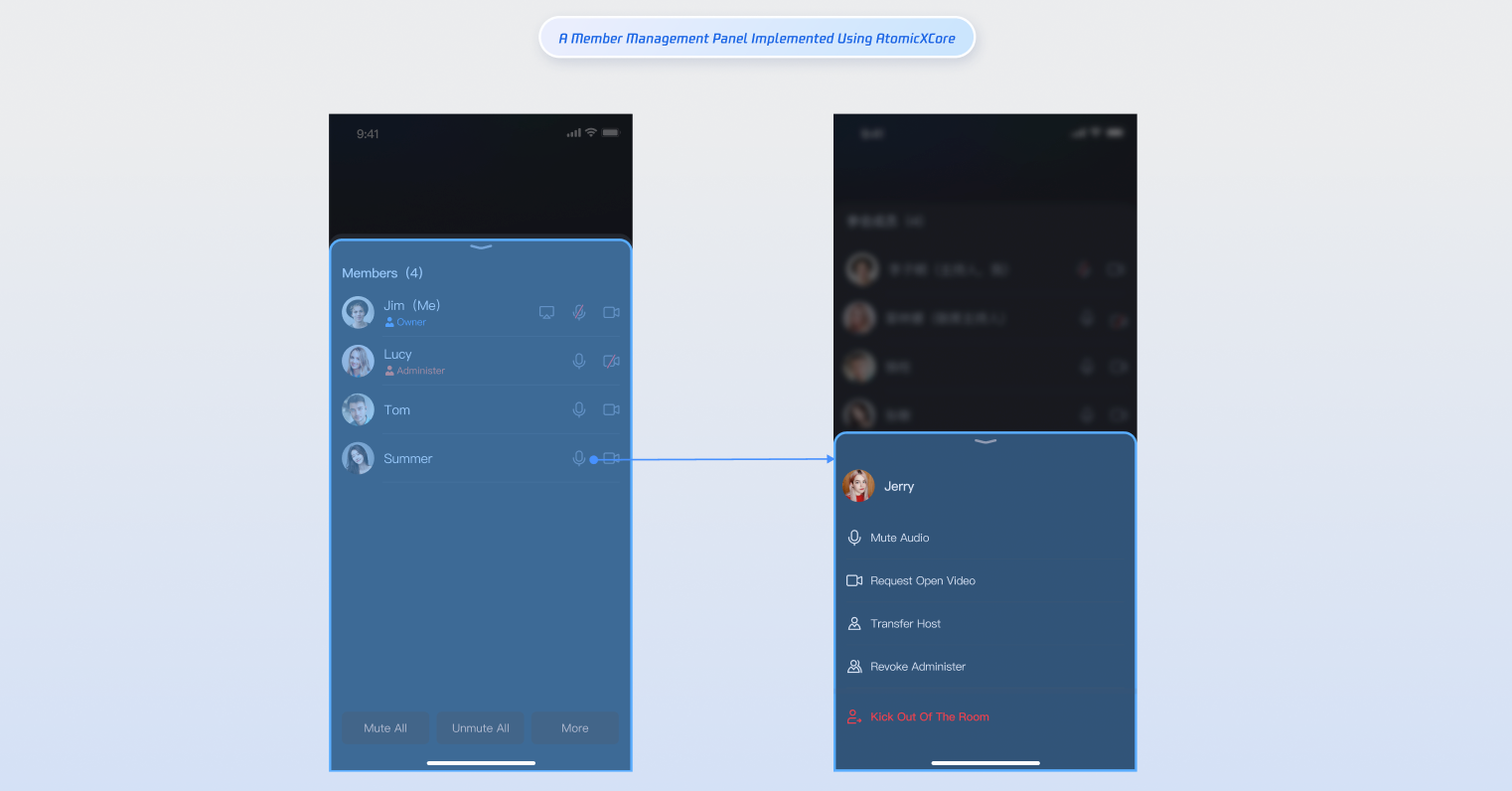
RoomParticipantStore is a specialized module within AtomicXCore designed for managing participants in a conference room. It provides essential functionality for multi-party conference scenarios, enabling you to build a robust participant management system.
Core Features
Get the participant list: Retrieve details for everyone currently in the room.
Transfer room ownership: The current owner can transfer ownership to another participant.
Grant/revoke admin role: The owner can promote participants to admins and revoke admin privileges.
Remove a participant: The owner or an admin can remove a participant from the room.
Update participant profile: Participants can update their own in-room profile information.
Manage audio/video devices: Invite participants to enable camera/mic, remotely turn off another participant’s camera/mic, and (for owners/admins) mute all or disable all video.
Core Concepts
The core concepts of RoomParticipantStore is summarized as follows:
Represents the participant data model, encapsulating participant information and state management.
Main functions include managing participant basic information (user ID, user name, user avatar, in-room role) and managing device status (microphone, camera, screen sharing, message status).
After joining a room, use the getParticipantList method in RoomParticipantStore to fetch the participant list.
importFoundation
importAtomicXCore
funcgetParticipantList(){
// Prerequisite: You must have joined the room and initialized RoomParticipantStore with roomID
let participantStore =RoomParticipantStore.create(roomID:"your_room_id")
// Retrieve participant list starting from the first page
let initialCursor:String?=nil// nil means fetch from the first page
participantStore.getParticipantList(cursor: initialCursor){ result in
switch result {
case.success(let participantInfo):
print("Participant list retrieved, count: \(participantInfo.0.count)")
case.failure(let error):
print("Failed to get participant list [Error code: \(error.code)]: \(error.message)")
}
}
}
Step 3: Search Room Members
Once you've joined the room, use searchUsers to search for members by keyword.
importFoundation
importAtomicXCore
funcsearchUsers(){
// Prerequisite: You must have joined the room.
let participantStore =RoomParticipantStore.create(roomID:"your_room_id")
// Search by user name keyword
let keyword ="userName"
participantStore.searchUsers(keyword: keyword){ result in
switch result {
case.success(let usersInfo):
print("Room members found, count: \(usersInfo.0.count)")
case.failure(let error):
print("Failed to search room members [Error code: \(error.code)]: \(error.message)")
}
}
}
Step 4: Transfer the Room Ownership
If you are the owner, use transferOwner to transfer ownership to any participant. The original owner becomes a regular participant; each room can have only one owner.
importFoundation
importAtomicXCore
functransferOwner(to userID:String){
// Prerequisite: You must have joined the room and initialized RoomParticipantStore with roomID
let participantStore =RoomParticipantStore.create(roomID:"your_room_id")
// Only the current owner can transfer ownership
participantStore.transferOwner(userID: userID){ result in
switch result {
case.success():
print("Ownership transferred. New owner: \(userID)")
case.failure(let error):
print("Ownership transfer failed [Error code: \(error.code)]: \(error.message)")
}
}
}
Participants can subscribe to the onOwnerChanged event via participantEventPublisher to receive ownership change notifications.
importFoundation
importAtomicXCore
importCombine
privatevar cancellableSet =Set<AnyCancellable>()
privatefuncsubscribeParticipantEvent(){
let participantStore =RoomParticipantStore.create(roomID:"your_room_id")
participantStore.rejectOpenDeviceRequest(device: device, userID: userID){ result in
switch result {
case.success():
print("Device request rejected: user \(userID), device: \(device)")
case.failure(let error):
print("Failed to reject request [Error code: \(error.code)]: \(error.message)")
}
}
}
Step 11: Mute All Microphones or Disable All Cameras
Owners and admins can use disableAllDevices to mute all microphones or disable all cameras in the room. Participants will not be able to enable these devices unless approved.
importFoundation
importAtomicXCore
let participantStore =RoomParticipantStore.create(roomID:"your_room_id")
// Mute/unmute all microphones or disable/enable all cameras
participantStore.disableAllDevices(device: device, disable: disable){ result in
switch result {
case.success():
let action = disable ?"Disabled":"Enabled"
print("\(action) all \(device) successfully")
case.failure(let error):
let action = disable ?"Disabled":"Enabled"
print("\(action) all \(device) failed [Error code: \(error.code)]: \(error.message)")
}
}
}
Participants can subscribe to onAllDevicesDisabled to stay updated on mute-all or disable-all camera actions and synchronize their UI. When restricted, participants must request permission to enable their devices.
importFoundation
importAtomicXCore
importCombine
let participantStore =RoomParticipantStore.create(roomID:"your_room_id")