
Android(Compose)
Component Overview
MessageInput is a message input component built with Jetpack Compose that provides users with complete message editing and sending capabilities. It supports composing and sending text (including emoji and group chat @mentions), voice messages, images, videos, and files, along with quote replies, and it can start audio/video calls from the "More" panel. The component supports multiple style configurations and also supports customizing actions in the "More" panel.
Message Input Interface | Emoji Picker |
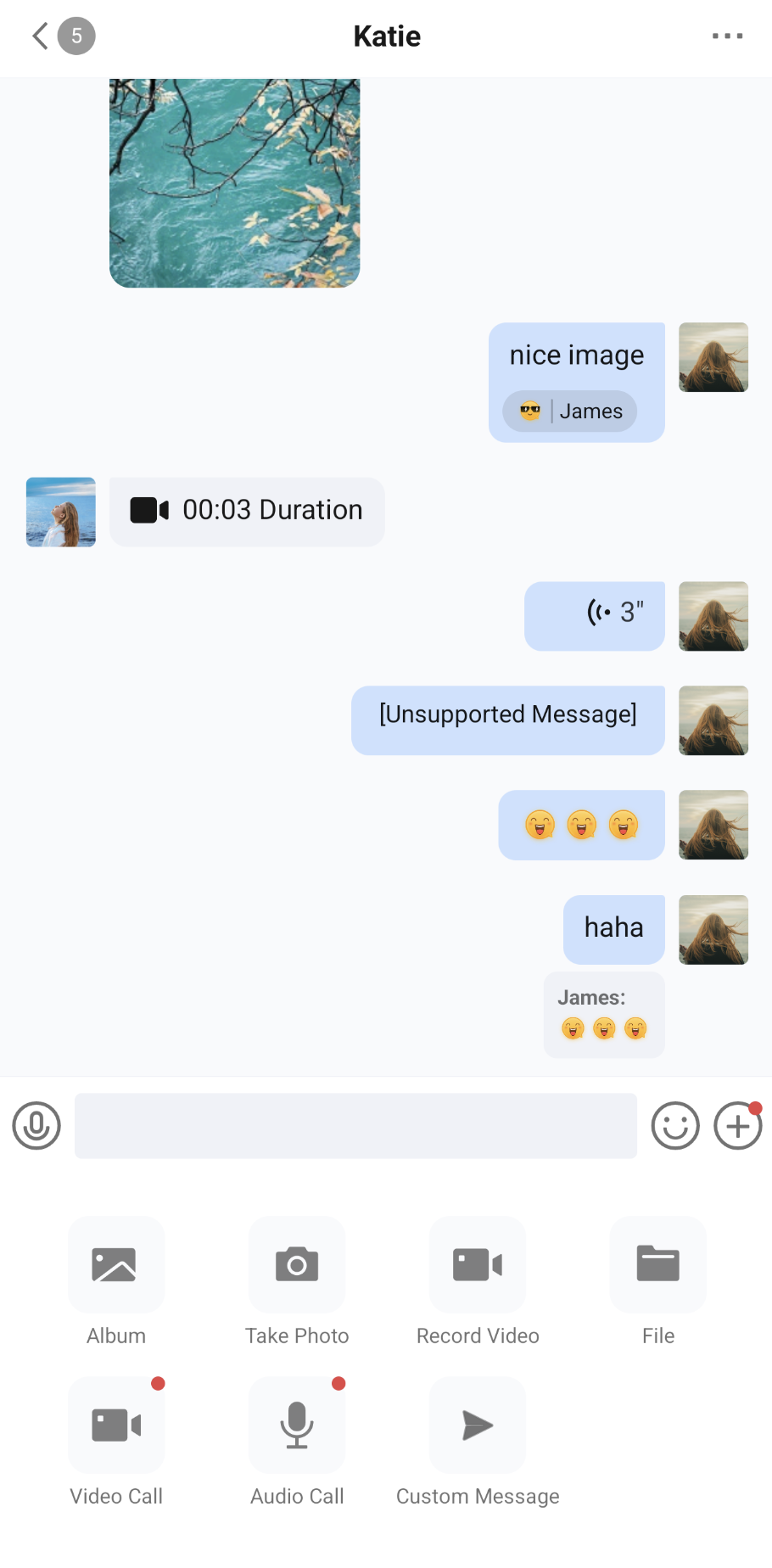 | 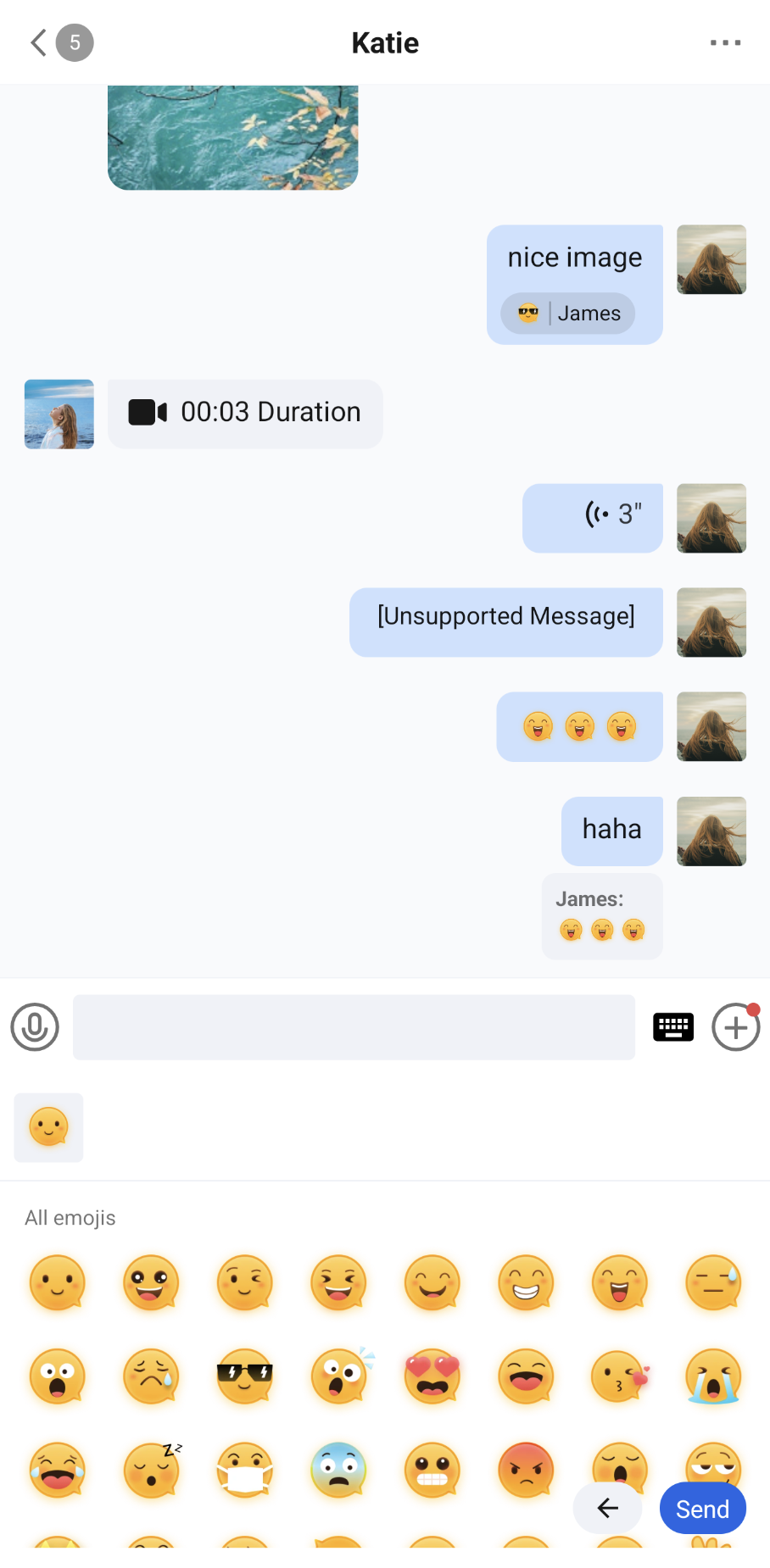 |
Integration
MessageInput is a component of TUIKit Compose. Integrate TUIKit Compose to get and use ConversationList. For detailed integration steps, see the TUIKit Compose documentation.
Component Structure
The MessageInput component includes the core message input component and the configuration protocol
MessageInputConfigProtocol. It provides message input functionality and supports customization.Public Methods
Method | Parameter | Description |
MessageInput | conversationID: String | Conversation ID that identifies the current chat conversation. For a one-to-one chat, the format is c2c_userID. For a group chat, the format is group_groupID. |
| modifier: Modifier | Used in Jetpack Compose to configure the component's style, layout, behavior, and appearance. |
| config: MessageInputConfigProtocol | Input box configuration that controls feature-entry visibility, @mentions, read receipts, audio recording duration, and the actions in the "More" panel. The default value is ChatMessageInputConfig(). |
| messageInputViewModelFactory: MessageInputViewModelFactory | Factory class for creating the component's internal MessageInputViewModel. Typically, you do not need to create it manually, as the component already provides a default implementation. |
| typingStatusSender: ((Boolean) -> Unit)? | Typing status callback, optional. While the user is editing text, it reports whether the input box has content, and it reports false after a message is sent. Typically, pass MessageListController's sendTypingStatus to send the typing status to the other user. For details, see "Use with MessageInput" in the MessageList component documentation. |
Basic Fuctions
You can initialize and use the MessageInput component directly by providing a conversation ID. To combine it with the message list into a complete chat page, see "Use with MessageInput" in the MessageList component documentation.
import androidx.compose.foundation.layout.Boximport androidx.compose.foundation.layout.fillMaxSizeimport androidx.compose.foundation.layout.systemBarsPaddingimport androidx.compose.runtime.Composableimport androidx.compose.ui.Alignmentimport androidx.compose.ui.Modifierimport io.trtc.tuikit.chat.uikit.components.messageinput.ui.MessageInput@Composablefun MessageInputScreen(conversationID: String) {Box(modifier = Modifier.fillMaxSize().systemBarsPadding(),contentAlignment = Alignment.BottomCenter) {MessageInput(conversationID = conversationID)}}
Note:
The sample project (demo) provides ChatActivity, a chat page built on ChatPage (with a title bar, an unread badge, group event handling, and more). You can reuse it directly or refer to its implementation for customization: ChatActivity.start(context, conversationID).
Customization
You can customize the feature entries on the input bar and the actions in the "More" panel, as follows.
Customizing Feature Entries
Use
ChatMessageInputConfig to set the features of the input box. All constructor parameters of ChatMessageInputConfig are optional named parameters. Properties that are not set use the default values:Property | Type | Description |
isShowAudioRecorder | Boolean | Whether to show the voice button on the left side of the input bar. Clicking it switches to "Press to Talk" mode. The default value is true. |
enableLongPressToTalk | Boolean | Whether to support long-pressing the input box to record audio (takes effect when the input box is empty and both the keyboard and panels are collapsed). When disabled, the hint text of the input box changes from "Type or hold to talk..." to "Send a message...". The default value is true. |
isShowEmoji | Boolean | Whether to show the emoji button. The default value is true. |
isShowMore | Boolean | Whether to show the "More" button. When the input box contains text, this position shows the send button. The default value is true. |
isShowPhotoTaker | Boolean | Whether to show "Take Photo" and "Record Video" in the "More" panel. The default value is true. |
isShowVideoCall | Boolean | Whether to show "Video Call" in the "More" panel. The default value is true. |
isShowAudioCall | Boolean | Whether to show "Audio Call" in the "More" panel. The default value is true. |
enableMention | Boolean | Whether to support opening the group member selection list when @ is entered in a group chat. The default value is true. |
enableReadReceipt | Boolean | Whether sent messages request a read receipt. This does not take effect in Community groups. Use it together with isShowReadReceipt of MessageList to display the read status. The default value is false. |
audioMaxRecordDurationMs | Int | Maximum recording duration of a single voice message, in milliseconds. Values less than 2000 are treated as 2000. The default value is 60000. |
For example, hide voice input, or hide all feature entries on the input bar:
import io.trtc.tuikit.chat.uikit.components.messageinput.config.ChatMessageInputConfigimport io.trtc.tuikit.chat.uikit.components.messageinput.ui.MessageInput// Hide voice inputMessageInput(conversationID = conversationID,config = ChatMessageInputConfig(isShowAudioRecorder = false, // Hide the voice buttonenableLongPressToTalk = false // Disable long-press recording in the input box))// Hide all feature entries on the input barMessageInput(conversationID = conversationID,config = ChatMessageInputConfig(isShowAudioRecorder = false, // Hide the voice buttonenableLongPressToTalk = false, // Disable long-press recording in the input boxisShowEmoji = false, // Hide the emoji buttonisShowMore = false // Hide the More button))
Note:
isShowAudioRecorder only controls whether the voice button is displayed. After the voice button is hidden, users can still long-press the input box to record audio. To fully disable voice input, also set enableLongPressToTalk to false.The customization results are shown in the figure below:
Default Input Box | Voice Recording Hidden on the Input Box |
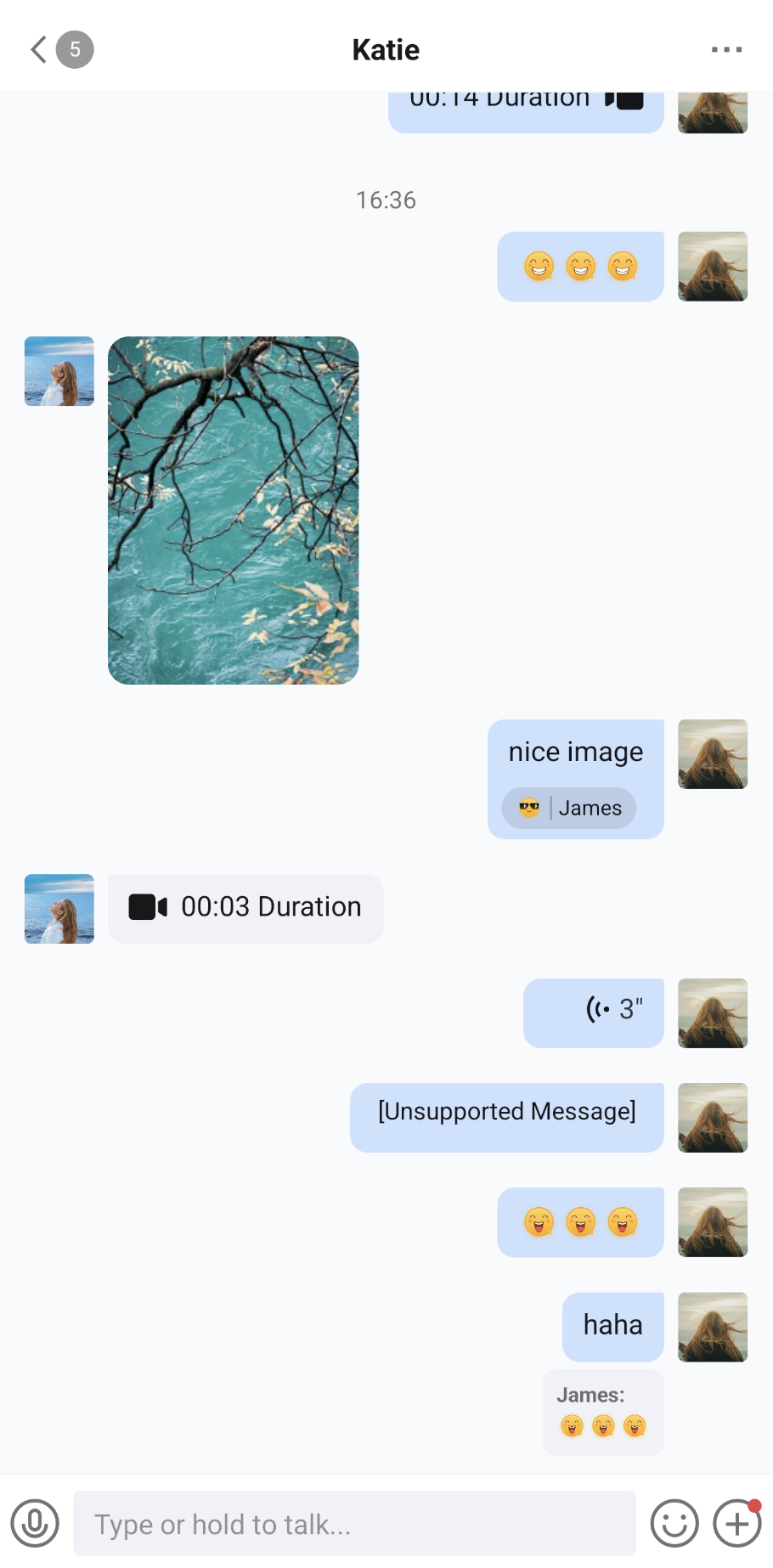 | 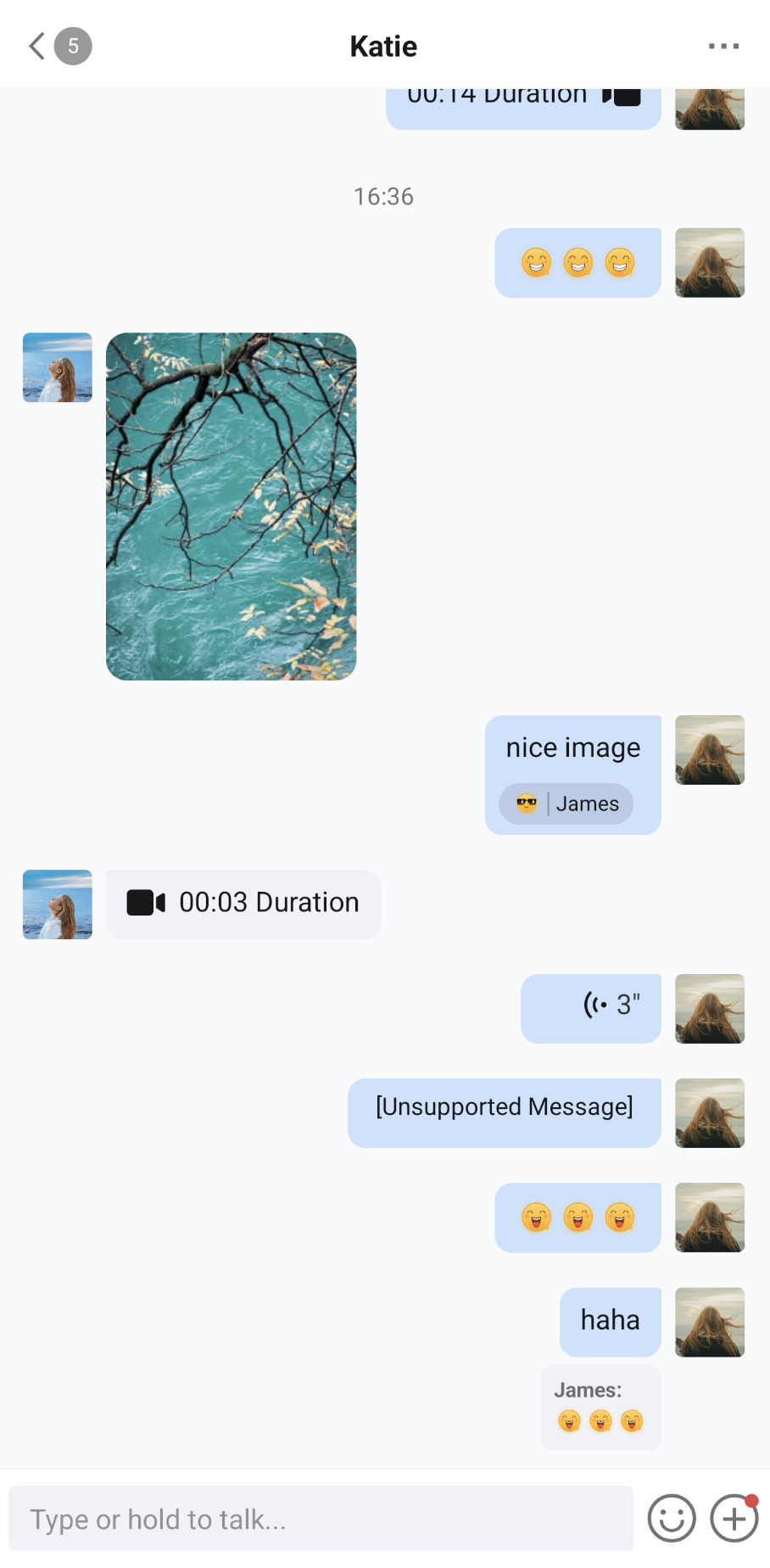 |
Editing Actions in the "More" Panel
Clicking the "More" button on the input bar expands the "More" panel. Each page of the panel displays 4 columns × 2 rows. When there are more than 8 actions, you can swipe left or right to change pages. The default actions, in order, are:
Action | ID | Description |
Album | MessageInputActionIDs.ALBUM | Select images or videos from the album and send them. |
Take Photo | MessageInputActionIDs.TAKE_PHOTO | Take a photo and send it. Not shown when isShowPhotoTaker is false. |
Record Video | MessageInputActionIDs.RECORD_VIDEO | Record a video and send it. Not shown when isShowPhotoTaker is false. |
File | MessageInputActionIDs.FILE | Select a file and send it. |
Video Call | MessageInputActionIDs.VIDEO_CALL | Start a video call. Not shown when isShowVideoCall is false. |
Audio Call | MessageInputActionIDs.AUDIO_CALL | Start an audio call. Not shown when isShowAudioCall is false. |
Use
customizeActions of ChatMessageInputConfig to edit the actions in the "More" panel. In customizeActions, you can get the current conversation ID from editorContext.conversationID and the Android Context from editorContext.androidContext, and call the following methods to edit the actions:Method | Description |
add(item) | Adds an action at the end. Throws IllegalArgumentException if the item ID is blank or duplicates an existing action ID. |
remove(ID) | Removes the action with the specified ID. Returns false if it does not exist. |
replace(ID) { item -> ... } | Replaces the action with the specified ID. Returns false if it does not exist. The replacement action must keep the same ID; otherwise, an exception is thrown. |
insertBefore(anchorID, item) / insertAfter(anchorID, item) | Inserts an action before or after the anchor action. Returns false and does not insert the action if the anchor does not exist. The ID rules for item are the same as for add. |
moveBefore(ID, anchorID) / moveAfter(ID, anchorID) | Moves an action to before or after the anchor action. Returns false if either ID does not exist. |
clear() | Removes all actions. |
items | A read-only snapshot of the current action list. |
The fields of
MessageInputMenuAction are described as follows:Field | Type | Description |
ID | String | Unique identifier of the action. Required. |
title | String | Title of the action. |
iconResID | Int | Drawable resource ID of the action icon. It must be set to a valid resource ID; otherwise, the app crashes. The icon is tinted with the theme text color, so a monochrome icon is recommended. |
onClick | () -> Unit | Callback invoked when the action is clicked. |
showRedDot | Boolean | Whether to show a red dot on the action. The default value is false. When any action shows a red dot, the "More" button also shows a red dot. |
dangerous | Boolean | Whether the action is dangerous. The default value is false. This currently does not affect the display style of the "More" panel. |
The sample code is as follows:
import android.content.Contextimport io.trtc.tuikit.chat.uikit.components.messageinput.config.ChatMessageInputConfigimport io.trtc.tuikit.chat.uikit.components.messageinput.data.MessageInputActionIDsimport io.trtc.tuikit.chat.uikit.components.messageinput.data.MessageInputMenuActionimport io.trtc.tuikit.chat.uikit.components.messageinput.ui.MessageInputval messageInputConfig = ChatMessageInputConfig(isShowPhotoTaker = false // Do not show "Take Photo" and "Record Video").customizeActions {val androidContext = editorContext.androidContext// Remove "File"remove(MessageInputActionIDs.FILE)// Add "Location" at the endadd(MessageInputMenuAction(ID = "custom.messageInput.location",title = "Location",iconResID = android.R.drawable.ic_menu_mylocation,onClick = {// Select a location and send it. editorContext.conversationID is the current conversation ID}))// Add a red dot to "Video Call", and hide the red dot after the user clicks itval prefs = androidContext.getSharedPreferences("red_dot", Context.MODE_PRIVATE)if (!prefs.getBoolean(MessageInputActionIDs.VIDEO_CALL, false)) {replace(MessageInputActionIDs.VIDEO_CALL) { action ->action.copy(showRedDot = true,onClick = {prefs.edit().putBoolean(MessageInputActionIDs.VIDEO_CALL, true).apply()action.onClick()})}}}MessageInput(conversationID = conversationID, config = messageInputConfig)
Note:
The code in customizeActions runs again each time the "More" panel is expanded. After the user clicks an action with a red dot, the red dot is hidden only for that expansion. To keep the red dot from appearing again, record the click state yourself, as in the sample.